Our Team Has 22+ Years Experience!
Our Team Has 22+ Years Experience!

In today's enterprise landscape, security within business applications is a strategic necessity. With Dynamics 365 Finance and Operations (D365 F&O), Microsoft provides a flexible, layered security framework that empowers organizations to manage access, mitigate risks, and maintain regulatory compliance.
Whether you're implementing D365 F&O for the first time or refining your security model post-go-live, this article outlines critical concepts, tools, and best practices that every solution architect and system admin should know.
Why Security in D365 F&O Matters
The security model in D365 F&O is tightly integrated with the platform's data access controls, business logic, and compliance needs. Here's why getting it right is crucial:
Key Concepts in D365 F&O Security
The security model is role-based and comprises several layers:
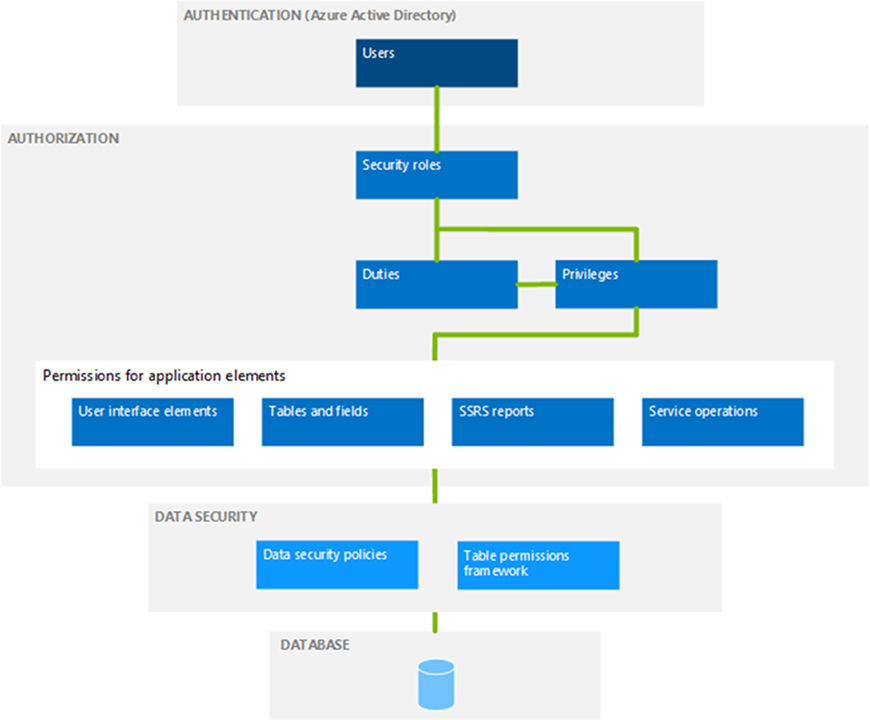
| Security Layer | Purpose |
|---|---|
| Security Role | Defines what a user can do within the system. Assigned directly to users. |
| Duties | Represent higher-level responsibilities or business processes. Grouped into roles. |
| Privileges | Define access to specific tasks or functions, such as reading or creating records. |
| Permissions | Control access to menu items, tables, fields, and methods. |
Each layer is customizable and extensible, allowing organizations to tailor access control to their specific needs.
Best Practices for Implementing Security
To implement a secure and scalable security model, follow these industry-aligned best practices:
Tools and Utilities That Support D365 F&O Security
D365 F&O includes several powerful tools to manage and monitor security:
Common Pitfalls to Avoid
While the security framework is robust, there are common mistakes that can lead to issues in governance or operations:
Evolving Your Security Model
Security in D365 F&O is not static—it must evolve alongside your business:
Final Thoughts
Security in Dynamics 365 Finance and Operations goes beyond access control—it's about enabling secure and compliant business operations. A well-architected security model promotes trust, minimizes risk, and ensures a smoother path toward digital transformation.
By embracing the principles of least privilege, aligning with business processes, and leveraging the tools provided by Microsoft, organizations can build a resilient and scalable security framework that supports long-term success.
Have questions or insights about implementing security in D365 F&O?
Feel free to connect to us.

At Dubizon, we're not just an IT consultancy; we're your strategic technology partner. Let us help you harness the power of technology to propel your business forward.


